DTF printing is a digital transfer method that prints designs onto special film and heat-presses them onto fabric. It can produce vibrant, durable results on nearly any garment color or material, and its setup is often more practical than traditional methods for smaller orders.
You may be looking at a company event, a fundraiser, a retail launch, or a team uniform order. The design has several colors, the garments might include cotton and polyester, and the deadline is close. Then you see four choices, screen printing, DTG, embroidery, and DTF, and the question becomes less “What looks good?” and more “Which method protects my budget without compromising the result?”
DTF, or direct-to-film printing, has become a flexible answer for many small and mid-sized apparel projects. It combines digital artwork, a transfer film, adhesive powder, and a heat press to create full-color decoration without the extensive setup associated with screen printing. The right choice still depends on order volume, garment type, design, turnaround, and the finish you want.
Table of Contents
- Why DTF Printing Is Taking Over Custom Apparel
- How the DTF Printing Process Works
- DTF vs Screen Printing vs DTG vs Embroidery
- Durability and Garment Care for DTF Prints
- Cost Factors and Turnaround Times
- Preparing Your Artwork for DTF Printing
- Best Use Cases for DTF Printing
Why DTF Printing Is Taking Over Custom Apparel
A small business owner might start with a simple request: a colorful logo on dark hoodies for a staff event. Screen printing could work, but several ink colors may require more preparation. Embroidery could look polished on polos, yet a detailed illustration may lose clarity. DTG can create a soft, detailed print, but the garment and production workflow may limit the project.
DTF gives that owner another route. The printer creates the design on a coated film, adds a bonding adhesive, and transfers the finished image to the garment with heat and pressure. Because the process uses CMYK color plus white ink, the design can remain visible and lively on dark fabrics instead of depending on the garment color as part of the image.
The technology emerged as a modern textile decoration method in the early 2000s, with roots tied to improvements in inkjet and digital printing. Commercial adoption accelerated in the late 2010s and early 2020s, according to the history of DTF transfers. That timeline helps explain why DTF may feel new to buyers even though the underlying ideas have developed over several years.
Why businesses pay attention to DTF
DTF is attractive when an order needs:
- Full-color artwork: Gradients, illustrations, photographs, and logos with several colors can be handled digitally.
- Flexible garment choices: The method works across cotton, polyester, and blends, including light and dark garments.
- Low setup complexity: The artwork can move into production without preparing a separate screen for every color.
- Small or mixed orders: A business can order different designs or garment colors without building the same setup for each variation.
- A quick production path: The workflow moves from digital file to printed transfer and then to heat application.
The scale of adoption is significant. A 2025 DTF market review from WTiN reports that more than 7.2 billion DTF prints were produced worldwide in 2024, representing almost 30% growth compared with the previous year. The same review cites projections for print volume to rise from 190 million square metres in 2022 to 1.0 billion square metres by 2027, with a projected 41% compound annual growth rate and retail value expected to reach US$14 billion by 2027.
That growth doesn't mean DTF wins every order. Large, simple cotton runs may still favor screen printing, while embroidered polos may communicate a more formal brand image. DTF earns its place when the order needs color flexibility, material range, low setup burden, and dependable visual detail.
How the DTF Printing Process Works
The easiest way to understand DTF is to think of it as creating a ready-to-apply patch of ink on a temporary carrier. The design doesn't go directly onto the shirt during the first printing stage. It is built on film, prepared with adhesive, and moved to the garment later.
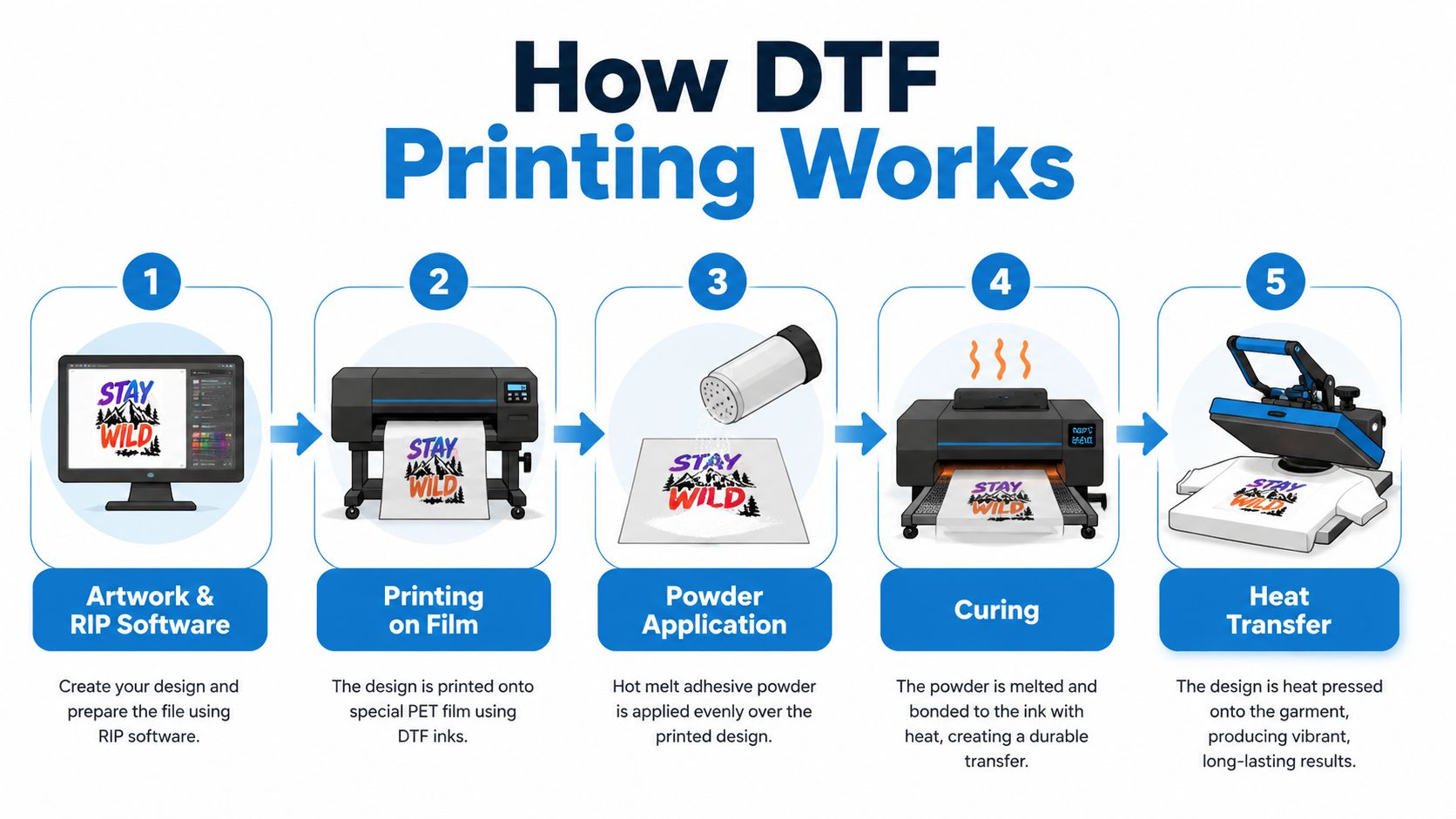
1. Artwork preparation and RIP software
The shop first checks the artwork, removes unwanted background areas, confirms the intended print size, and prepares the file in RIP software. RIP software controls how the printer lays down color, white ink, and other print settings. It also helps the operator manage placement and ink density.
A transparent background matters for a non-rectangular design. If a customer sends a logo with a white box around it, that box may become part of the transfer unless the artwork is corrected before printing.
2. Printing onto coated PET film
The printer lays down the design in reverse onto a coated PET film. The color layer uses CMYK inks, followed by a white-ink layer that acts like primer on a dark wall. The white underbase gives the color layer opacity, so red, yellow, and other bright areas don't disappear into a black or navy garment.
The Direct to Film printing overview describes this reverse-printing workflow and notes typical heat-press conditions of about 150–170°C for 10–15 seconds, although the correct setting depends on the film, powder, garment, and press.
3. Applying the hot-melt adhesive powder
The printed film receives a layer of hot-melt adhesive powder, typically TPU-based. The powder melts at approximately 140–160°C, creating the bonding layer that connects the printed design with the fabric fibers. It also contributes to wash resistance and the finished print's hand feel, as explained in this DTF powder guide.
The powder must cover the printed areas evenly. Too little adhesive can weaken the bond. Excess powder can affect the edge, texture, and appearance of the transfer.
4. Curing the transfer
Heat cures the adhesive so it becomes a stable bonding layer. Production shops may use a curing oven, shaker unit, or integrated curing system. The operator must control heat and time carefully because under-curing can lead to peeling or poor wash performance.
Production-grade systems commonly use white-ink circulation, humidity control around 40–60%, and print resolutions from 720×1800 to 720×2400 DPI, according to the Quatro DTF transfer printing system information. White-ink circulation helps reduce settling and clogging, while stable humidity supports consistent dot formation and drying.
Here's a useful production detail for buyers: a reliable transfer depends on more than the printer itself. Film storage, powder coverage, curing, artwork handling, and press settings all affect the result.
5. Heat-pressing onto the garment
The shop places the cured transfer on the garment, presses it with firm, even pressure, and peels the carrier according to the film specification. Some films are peeled hot, while others require a cold peel. The transfer conditions supplied by the manufacturer should control the process.
For a practical visual explanation of the workflow, watch the demonstration below.
If you want to understand the garment-side application in more detail, this guide to DTF printing on T-shirts covers the transfer stage from an ordering perspective.
DTF vs Screen Printing vs DTG vs Embroidery
Choosing a decoration method is a cost and design decision, not a popularity contest. The best option changes when the order changes. A one-color cotton order at high volume has different economics from a small run of full-color hoodies with several garment materials.
| Criteria | DTF | Screen Printing | DTG | Embroidery |
|---|---|---|---|---|
| Setup | Low setup burden for digital artwork | More preparation, especially with multiple colors | Digital setup, with garment preparation | Digitizing required before stitching |
| Small orders | Often practical for small and mixed runs | Setup can make small runs less attractive | Suitable for detailed garment prints | Practical for limited quantities, depending on design |
| High-volume simple designs | Can work well, especially with varied garments | Often strong for large runs with simple artwork | May be less efficient than screen printing for large basic orders | Usually slower for large graphic areas |
| Color detail | Strong for multicolor artwork and gradients | Good, but each color needs its own process | Strong detail and a soft ink feel | Limited by thread colors and stitch structure |
| Fabric range | Cotton, polyester, and blends | Depends on inks and garment handling | Fabric and pretreatment affect results | Best suited to stable fabrics such as polos, jackets, hats, and bags |
| Garment color | Works on light and dark garments with white ink | Works on dark garments with suitable ink layers | White garments often simplify the process | Garment color remains visible around the stitching |
| Finish | Slightly raised transfer feel | Ink or transfer feel depends on the ink system | Ink integrates more directly with the fabric | Textured, stitched, dimensional finish |
| Turnaround | Efficient after artwork approval | Setup and color separation can add preparation | Direct garment workflow can be efficient | Digitizing and stitching time affect delivery |
When DTF makes the financial sense
DTF often makes sense when you have a low-to-mid-volume order, several colors in the artwork, and garments made from more than one material. You avoid building a separate screen setup for every color, and you can keep one design adaptable across shirts, hoodies, bags, and similar products.
Screen printing can still win when the design is simple and the quantity is large enough to spread setup work across many garments. Its ink can also produce a familiar, solid graphic finish that many brands prefer for basic promotional shirts.
DTG is worth considering when the design needs a soft, fabric-integrated feel and the garments are suitable for direct printing. It prints onto the garment rather than creating a separate transfer, so the shop's pretreatment and garment handling become important parts of the result.
Where embroidery belongs
Embroidery is usually the more natural choice for a corporate polo, cap, jacket, or work shirt where a stitched logo reinforces a professional uniform appearance. It handles text and compact logos well, but highly detailed artwork, gradients, and large graphic areas can become unsuitable or visually heavy.
Practical rule: Choose DTF for colorful, flexible apparel decoration. Choose screen printing for large runs with simple artwork, DTG for a soft direct-to-garment finish, and embroidery for compact logos on structured garments.
For a deeper cost and application comparison, review this guide to DTF versus screen printing. The key is to compare the complete order, including setup, labor, garment compatibility, artwork complexity, and delivery requirements.
Durability and Garment Care for DTF Prints
A client ordering event shirts usually cares about two things: whether the design survives repeated wear and whether early peeling creates replacement work. DTF durability depends on transfer materials, adhesive coverage, curing, pressing, garment quality, and laundering. Properly made prints can last about 50 to 80+ wash cycles, while poor curing or budget materials may reduce durability to roughly 20 to 40 washes, according to this DTF transfer durability guide.
Color alone cannot confirm quality. A bright print may still fail if the adhesive was not cured correctly or the press did not apply enough heat and pressure. Independent and industry references commonly use 50+ wash cycles as a durability benchmark, with procedures such as ISO 6330 and colorfastness frameworks such as ISO 105 used in some testing contexts, as described by this DTF wash-performance reference.
What affects print life
- Adhesive quality: TPU powder forms the bonding layer between ink and fabric.
- Curing: The powder must melt and settle properly before the transfer reaches the garment.
- Press conditions: Heat, time, and firm pressure must match the transfer specification.
- Fabric movement: Stretching and friction place more stress on the printed area.
- Laundry habits: High heat, harsh chemicals, and aggressive drying can weaken the bond.
DTF transfers are typically applied around 300–310°F for 15–20 seconds with firm, even pressure, according to the durability testing guide linked above. These settings are not universal, so the shop should adjust them for the specific transfer and garment. For practical setup guidance, review this heat press temperature guide.
How to wash DTF apparel
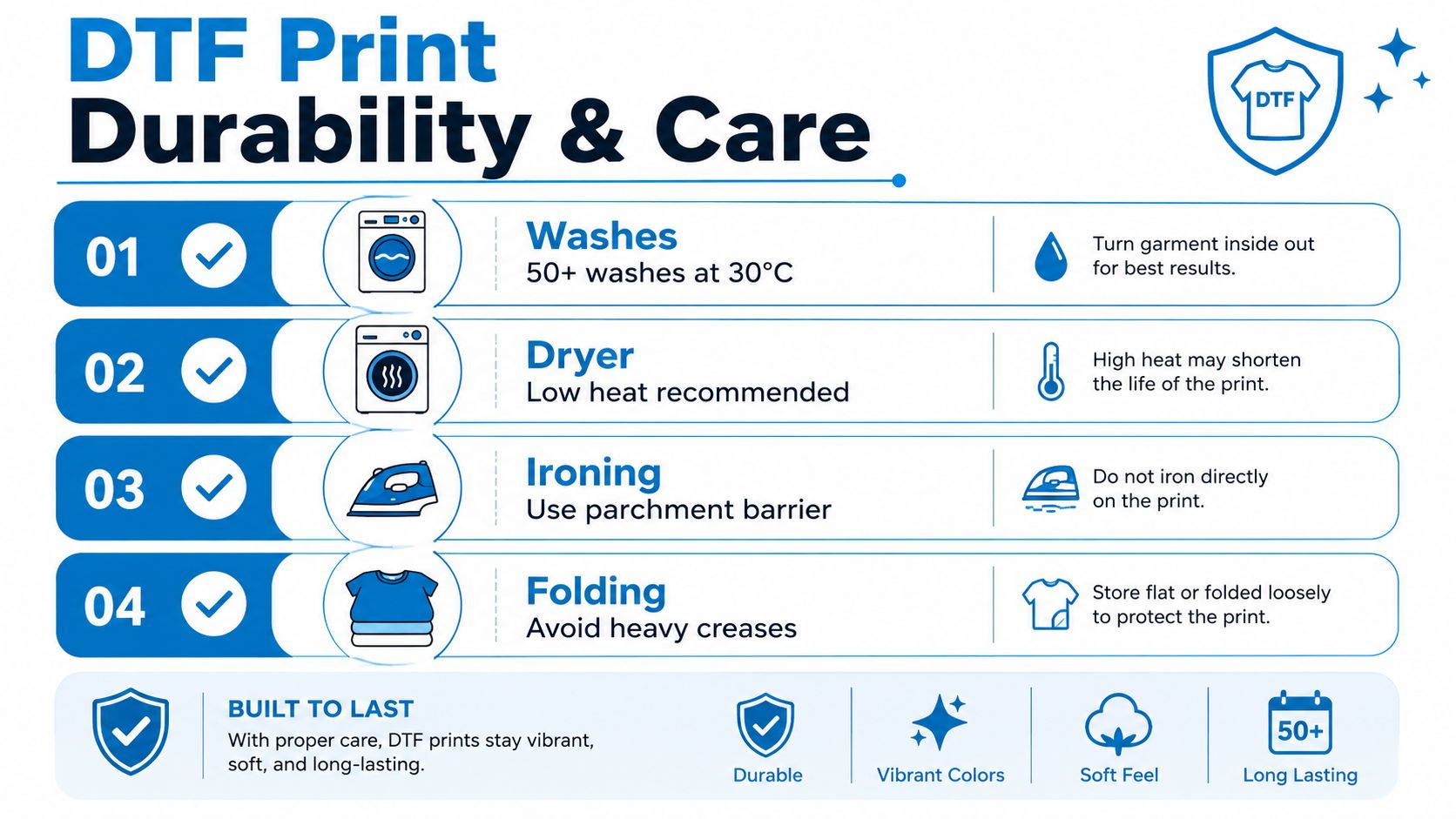
Routine home washing above 40°C (104°F) can weaken the adhesive bond over time, while quality prints generally tolerate laundering at or below 60°C, according to this high-temperature washing guide for DTF prints. For the safest routine, wash garments inside out at 30°C or cold, avoid bleach, and use low heat or air drying.
Do not iron directly over the print. If ironing is necessary, place a protective parchment barrier between the iron and the design. Store the garment without forcing a heavy crease through the printed area.
A well-made transfer should feel bonded to the fabric, not loose at the edges. Peeling corners, powdery residue, cracking after light stretching, or inconsistent gloss can signal a curing or application problem.
Cost Factors and Turnaround Times
The useful cost question isn't just “How much does a DTF shirt cost?” It's “What work and materials are included in the price?” A transparent quote should account for the garment, film, ink, adhesive powder, artwork preparation, pressing labor, packaging, and potential spoilage.
DTF frequently becomes attractive for smaller and medium orders because digital artwork doesn't require the same color-by-color screen preparation as screen printing. That advantage becomes more noticeable when the design includes gradients, names, individual variations, or several garment colors. Screen printing may become more economical for a large order with one simple design, because the setup cost is distributed across more units.
Build the decision from five cost buckets
- Artwork handling: Complex files may need cleanup, separation, or proof adjustments.
- Consumables: Film, CMYK ink, white ink, and TPU adhesive powder all contribute to material cost.
- Labor: Printing, powdering, curing, pressing, inspection, and packing take time.
- Garments: The shirt, hoodie, polo, bag, or outerwear piece may cost more than the decoration.
- Spoilage and rework: Misprints, damaged transfers, garment defects, and incorrect placement can affect the final margin.
Pricing has become a major driver of DTF investment, and market reports identify cost optimization as a central buyer concern. Forecasts differ, but one market forecast projects the market at USD 3.08 billion in 2026 and USD 4.56 billion by 2032, while another estimate cited in the same discussion places those values at USD 2.85 billion and USD 4.46 billion. Those projections indicate commercial interest, but they don't replace an order-specific quote.
What changes the delivery schedule
Turnaround depends on artwork approval, garment availability, print size, number of designs, production workload, and quality checks. A single approved design on available garments moves differently from an order containing several logos, personalized names, and multiple garment styles.
Ask the shop when the clock starts. A clear answer should distinguish between receiving artwork, approving the proof, receiving garments, beginning production, and shipping the finished order. Confirm whether color adjustments or placement changes require a new approval before production.
Preparing Your Artwork for DTF Printing
Artwork preparation can protect both your budget and your deadline. A print shop can often correct a file, but corrections take time, and a low-quality source image may not contain enough information to reproduce fine details cleanly.
Start with the largest, cleanest version of your logo or design. Vector artwork is often the easiest format to scale because paths remain sharp at different sizes. If the only file available is a JPEG, send the original rather than copying and enlarging a compressed screenshot.
File preparation checklist
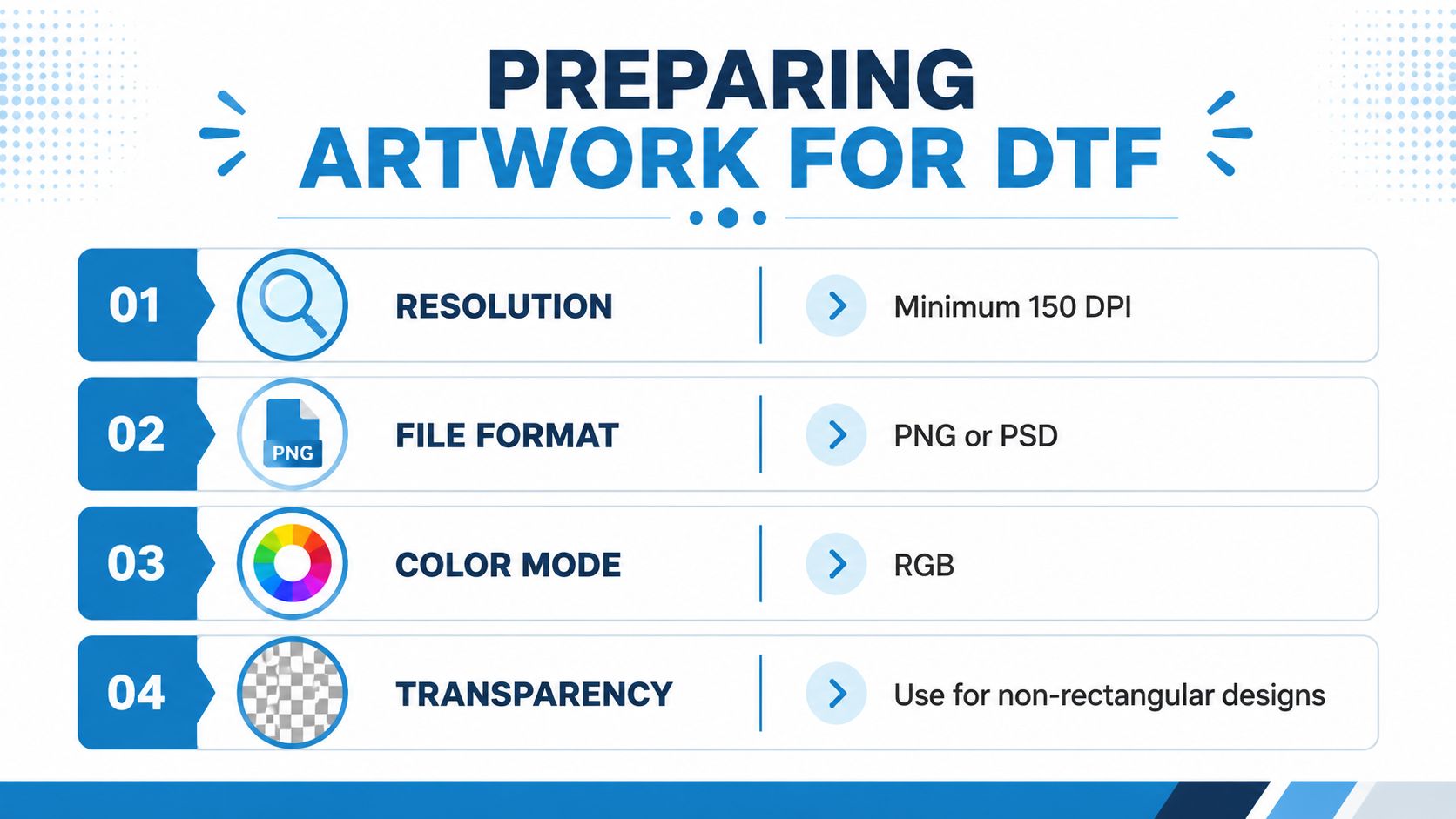
- Resolution: The supplied artwork should contain enough detail for the intended print size. The provided artwork guide lists 150 DPI as a minimum.
- File format: PNG and PSD files are commonly useful for raster artwork, especially when transparency is needed. Vector formats may be preferable for logos.
- Color mode: The same guide recommends RGB for artwork preparation. A shop may still adjust the file during its RIP workflow.
- Transparency: Use a transparent background for designs that shouldn't print as a rectangle.
- Fine details: Very thin lines and tiny text may not transfer or read clearly at the final size.
- Placement: Tell the shop whether the design belongs on the left chest, full front, back, sleeve, or another location.
A proof should show the design, approximate size, placement, and colors before production. Look for missing background transparency, incorrect logo proportions, unexpected white areas, and artwork that appears too small for the garment.
If your logo is only a JPEG
Don't trace it yourself unless you know how the result will be used. Send the original file, describe the intended garment and print size, and ask the shop whether the image can be cleaned or recreated. A professional review can identify whether the file needs background removal, sharpening, vector conversion, or a simpler treatment.
Dirt Cheap Product, Inc. reviews uploaded logos, provides proofs for approval, and offers DTF alongside screen printing, embroidery, sublimation, and custom patches. Treat the proof as a production document, not a formality. Once you approve the artwork, changes to color, size, or placement may affect timing and cost.
Best Use Cases for DTF Printing
DTF is a strong fit when the order needs visual complexity without a heavy setup burden. An event organizer might need colorful shirts for volunteers, a nonprofit may want a small fundraiser run, or a retailer may test a graphic on several garment colors before committing to a larger merchandise program.
The method is especially useful for multicolor designs on dark garments. The white underbase keeps the artwork visible, while the transfer workflow lets one digital file serve different garment colors and materials. That flexibility helps when an order includes cotton T-shirts, polyester performance wear, and blended sweatshirts.
Projects that often suit DTF
- Event apparel: Use DTF for staff shirts, race merchandise, reunion apparel, and campaign designs where artwork detail matters.
- Fundraisers: Small batches can carry a full-color logo or illustration without requiring a large standardized run.
- Retail merchandise: DTF supports detailed graphics on T-shirts, hoodies, totes, and related products.
- Staff uniforms: Choose DTF when the uniform needs a colorful graphic rather than a compact stitched logo.
- Promotional programs: Marketing teams can use transfers across selected apparel and accessories when the campaign has varied artwork.
- Mixed-material orders: DTF can handle cotton, polyester, and blends, making it useful when one project includes different fabric types.
DTF may not be the first choice for every uniform. A simple logo on a corporate polo may look more appropriate as embroidery, while a large run of basic one-color shirts may favor screen printing. The decision should follow the design and order profile, not the decoration method currently receiving the most attention.
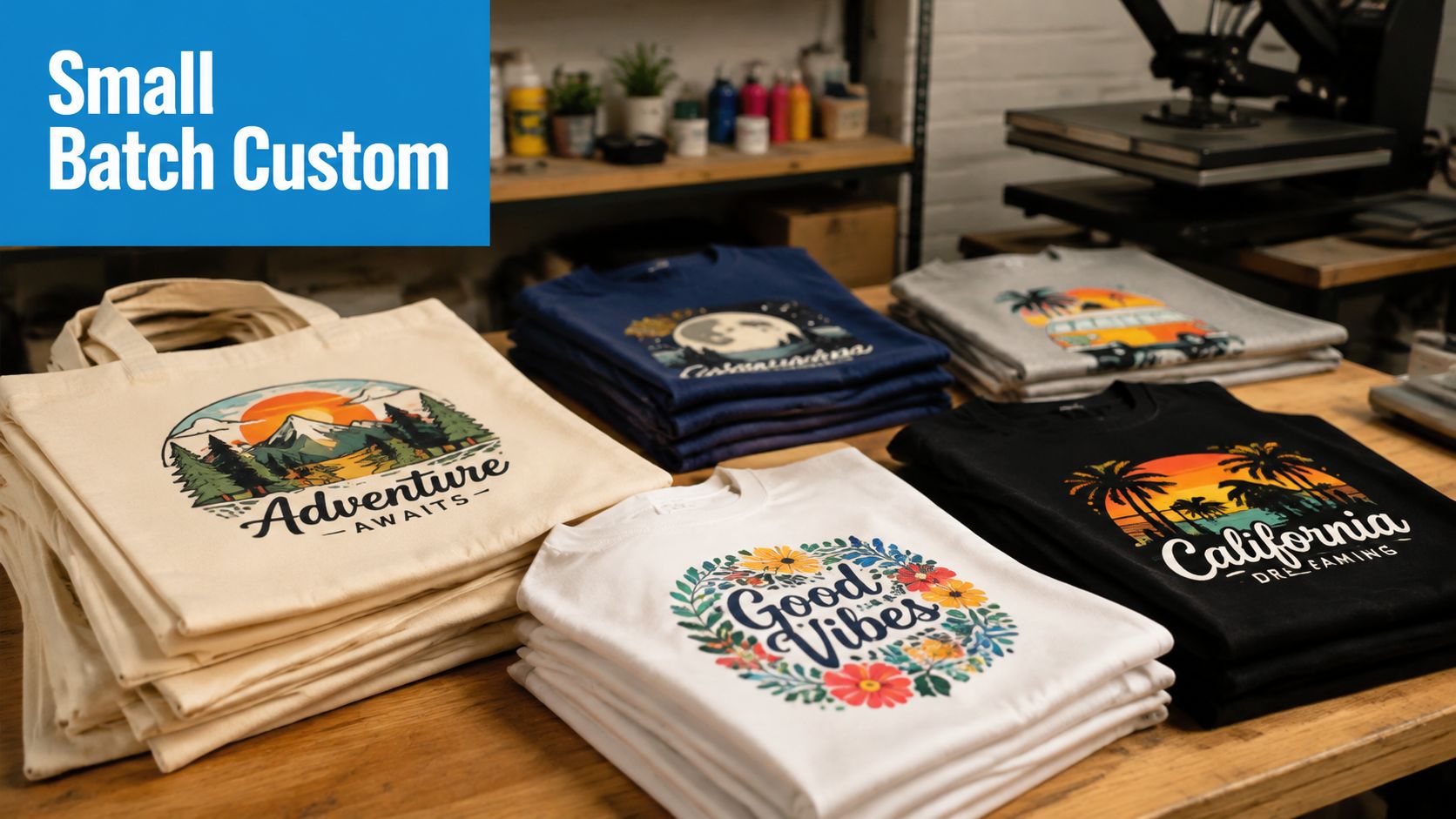
Before ordering, prepare the artwork, identify the garment types, confirm the print locations, and state the delivery date. Request a proof and ask which decoration method best fits the specific order. That conversation often reveals whether DTF really beats screen printing, DTG, or embroidery once all practical costs are considered.
Dirt Cheap Product, Inc. offers DTF printing for full-color custom apparel and promotional products, along with screen printing, embroidery, sublimation, and custom patches. Upload your logo, review the proof, and visit Dirt Cheap Product, Inc. to discuss garments, placement, quantities, and delivery for your next project.