
You need 18 branded T-shirts for a product launch in nine days. Screen printing has a minimum you can't reach, your logo includes photographic detail, and the garments are heather cotton. The practical question isn't “What is direct to garment printing?” It's whether DTG fits your quantity, fabric, artwork, garment color, and deadline.
Direct-to-garment printing, or DTG, is a digital inkjet process that deposits water-based textile inks directly onto a garment, much like a desktop printer loaded with a shirt instead of paper. The printer uses CMYK inks and often white ink, while pretreatment and heat curing help the image bind to the fabric and withstand washing. DuPont's technical documentation describes pretreatment as a functional part of the process, not a cosmetic extra.
The sections below will show you how a decorator turns a digital file into a finished shirt, why cotton usually performs better than polyester, and how DTG compares with screen printing, DTF, and sublimation. You'll also learn how to prepare artwork, understand a quote, care for the finished garment, and decide whether DTG makes sense for your project.
Table of Contents
- What Is Direct to Garment Printing
- How the DTG Process Works Step by Step
- Inks, Pretreatment, and Curing Explained
- DTG vs Screen Printing, DTF, and Sublimation
- Artwork and File Preparation Essentials
- Cost Drivers, Turnaround, and Order Size
- Care and Washing Instructions for DTG Prints
- When to Choose DTG for Your Apparel Project
What Is Direct to Garment Printing
The simple definition
A DTG printer places a garment on a flat platen and sprays water-based pigment ink directly onto its surface. The machine reads a digital design, places tiny droplets of cyan, magenta, yellow, and black, and adds white ink when the garment needs an opaque base. The result is a full-color print created without screens, stencils, or transfer film.
That direct digital workflow makes DTG useful when every shirt may carry a different image, name, or variation. It also handles gradients, fine detail, and photographic artwork without requiring a separate physical setup for each color. The important qualification is fabric. DTG printing basics from Sharprint identifies natural fibers, especially 100% cotton, as the strongest fit because cotton absorbs the ink well.
What matters before you order
Start with the buyer's decisions, not the machine:
- Order size: A small batch can favor DTG because the shop can work from a digital file without building a screen setup.
- Fabric: Cotton usually gives the most predictable result. Polyester and stain-resistant finishes can repel water-based inks or reduce print quality.
- Garment color: Dark shirts need a white underbase so the CMYK colors remain visible.
- Design complexity: Photographs, gradients, and multicolor artwork are natural DTG applications.
- Deadline: Printing may be quick, but pretreatment, drying, curing, inspection, and packing still take production time.
DTG first appeared as a commercial production method in the United States in 1996, when DIS introduced the commercially available Revolution printer in Bradenton, Florida. The related patent was filed in July 1996 and granted in August 2000. Later milestones included Mimaki and Kornit introductions in 2004, followed by Brother's GT-541 launch in 2005, widely cited as the first ground-up DTG printer to reach market. The documented DTG timeline shows how the method developed from a niche process into a mainstream apparel decoration option.
How the DTG Process Works Step by Step
A production manager sees DTG as a sequence of controlled handoffs. A problem at one stage usually appears on the finished shirt, so the operator checks each stage before moving forward.
From artwork to platen
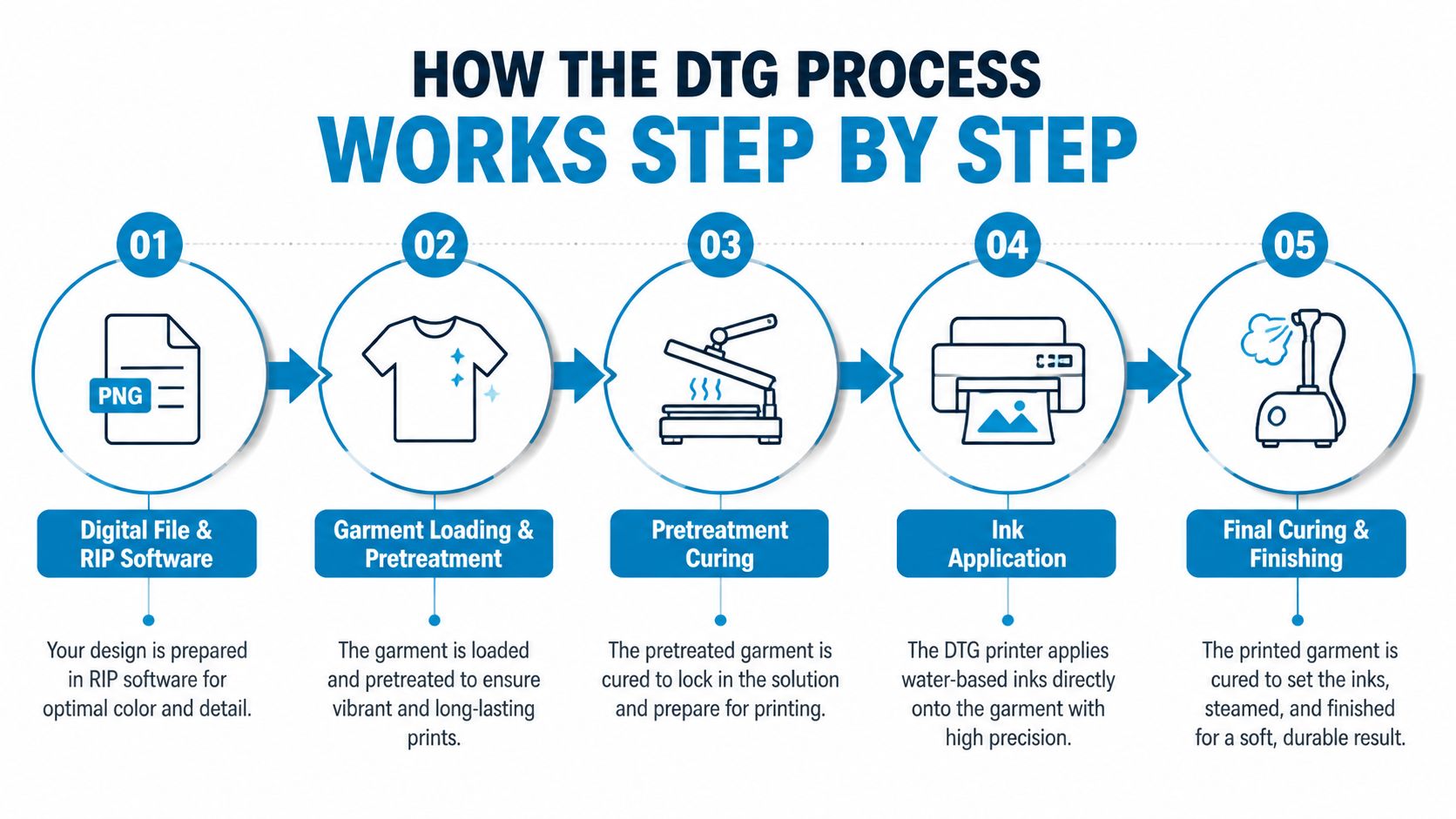
The digital file enters RIP software. The RIP, or Raster Image Processor, interprets the artwork and controls ink placement, color density, and the white layer. The operator checks the print dimensions, garment color, and placement before production.
The blank garment is loaded. The operator smooths the shirt over the platen, aligns the print area, and removes lint or wrinkles. A crooked or uneven load can create placement errors even when the artwork file is perfect.
Pretreatment is applied. The operator sprays or dips the print area with a pretreatment solution. It must be applied evenly and allowed to dry or cure before ink application. This layer helps the ink bind to the textile surface, particularly when white ink is required.
Ink is deposited. On a light garment, the printer generally applies CMYK directly. On a dark garment, it lays down a white underbase first, then places the CMYK colors over it. Without that white layer, colors tend to look muted against dark cotton.
The print is cured. A heat press uses heat and pressure, while a conveyor dryer uses heat as the garment moves through the equipment. Curing fixes the ink and improves wash durability. Graphics Pro's explanation of pretreatment and curing explains why white ink and pretreatment require careful mechanical control.
After curing, the operator checks coverage, edges, placement, and surface appearance. The shirt is then folded and packed. A printer may apply ink rapidly, but the full job includes handling and finishing. Printful's DTG workflow overview also identifies loading, pretreatment, printing, and drying as core steps.
The following video provides a visual look at the production sequence:
Inks, Pretreatment, and Curing Explained
A buyer choosing between a light cotton shirt, a dark hoodie, or a blended garment is also choosing how the print will behave. Ink deposition, pretreatment, and curing work together, so changing the garment or skipping one step can change the color, softness, and wash durability.
What each stage does
DTG printers use water-based pigment inks, commonly CMYK plus white. The printer places the ink directly onto the garment. Pretreatment helps the ink bind to the textile surface, and heat then fixes the image instead of leaving it loosely on the fabric. For more background, this guide to water-based ink printing explains how these formulations behave.
Pretreatment has its greatest effect on dark garments. White ink uses titanium dioxide to create opacity, so it needs a bonding layer and controlled surface absorption. Too little or uneven pretreatment can produce weak coverage and inconsistent color. Too much may change the shirt's surface appearance or hand feel.
Curing depends on both temperature and time. Technical production guidance commonly places it around 160 to 170°C, or 320 to 338°F, for roughly 35 to 180 seconds, depending on the equipment and garment. Insufficient curing can reduce wash durability, while overcuring can scorch fibers or make the print feel dull. The documented DTG process specifications describe these risks and the need to match the settings to the production setup.
Fabric changes the result
Cotton absorbs water-based ink efficiently. A smooth 100% cotton garment therefore tends to produce strong color and a comfortable, fabric-integrated print surface. Cotton blends can work, but their synthetic fibers absorb less ink. Fine details may look softer or more muted as a result.
| Fabric Type | Pretreatment Needed | White Underbase | Resulting Hand Feel | Color Vibrancy |
|---|---|---|---|---|
| 100% cotton | Yes | Needed on dark garments | Soft, fabric-integrated feel | Strong and consistent |
| Cotton blend | Yes | Needed on dark garments | Generally soft, potentially less even | Can appear more muted |
| Polyester-heavy fabric | Requires testing | Often needed on dark garments | May vary by finish | Can be reduced |
| Stain-resistant fabric | May not produce reliable results | Depends on garment color | May feel uneven | Ink can be repelled |
Ask the decorator to test or recommend the blank garment before approving production. The same artwork can look different on a smooth cotton tee, a blend, and a stain-resistant fabric, so the shirt choice matters as much as the file.
DTG vs Screen Printing, DTF, and Sublimation
The right decoration method depends on four questions: How many pieces do you need? What is the fabric? What color is the garment? How detailed is the design?
Screen printing uses separate screens and is generally stronger for larger runs with limited colors and simple artwork. Its setup work makes a small, highly variable order less convenient. At higher quantities, however, the process can produce a lower per-unit cost than DTG because the setup is spread across more garments.
DTF, or direct-to-film printing, creates the design on film before transferring it to the garment. That extra film-and-powder stage gives DTF more flexibility across polyester blends and difficult placements. The finished transfer can feel different from a direct print, often with a more noticeable layer on the garment.
Sublimation works through dye transfer and is limited to polyester or specially coated items. It doesn't provide white ink, so it's not suitable for a dark cotton shirt that needs an opaque design.
| Method | Best Order Size | Fabric Fit | Color/Garment | Design Detail |
|---|---|---|---|---|
| DTG | Small runs and variable orders | Best on cotton | Light or dark garments, with white underbase on dark colors | Excellent for photographs, gradients, and multicolor art |
| Screen printing | Larger runs | Strong on cotton and compatible fabrics | Works with simple spot-color designs and specialty inks | Best for bold, limited-color artwork |
| DTF | Small to medium runs | Broad fabric flexibility, including many blends | Useful for varied garment colors and difficult placements | Handles detailed artwork and transfers |
| Sublimation | Polyester-focused orders | Polyester or poly-coated items | Best on light surfaces because it has no white ink | Strong for vivid, continuous-color designs |
A useful decision matrix looks like this:
- Small batch, photographic art, dark cotton: DTG is often the natural fit.
- Large batch, simple logo: Screen printing often deserves the quote comparison.
- Polyester or non-cotton garment: DTF or sublimation may be more suitable.
- Complex artwork on a challenging placement: DTF can offer greater placement flexibility.
For a closer technical comparison, see this guide to the difference between DTG and DTF. DTG's central advantage is clear: it handles short runs with complex, multicolor artwork without turning every color variation into a separate physical setup.
Artwork and File Preparation Essentials
A decorator can only print what the file communicates. Clean artwork reduces questions, prevents avoidable revisions, and gives the production team a reliable target.
Send a production-ready file
Use this checklist before uploading:
- File format: A transparent PNG is a common choice for DTG artwork. TIFF works well for photographic files.
- Resolution: Supply the file at 300 dpi at the final print size. A small image enlarged after submission may look soft or pixelated.
- Color profile: Work in sRGB and embed the color profile. Avoid treating a CMYK file as the final authority because the DTG workflow maps the artwork to CMYK inks plus a possible white underbase.
- Background: Remove unwanted white or colored boxes. Transparency lets the garment remain visible around the design.
- Dark garments: Confirm that the decorator will apply a white underbase beneath CMYK. Ask how large solid white areas will be handled because heavy ink coverage can change the print's hand feel.
- Placement: Include a mockup or specify the measurement in inches. Identify front, back, sleeve, pocket, and inside-neck placements separately.
Why color preparation matters
A screen image can't predict every printed result because the garment color, ink density, and white layer influence the final appearance. A professional decorator should review the file against the selected blank and flag missing transparency, incorrect dimensions, or unsuitable resolution before production.
If you need background on color spaces before exporting, use this explanation of RGB to CMYK conversion. Don't flatten a file without checking the edges first. Stray pixels and hidden backgrounds often become visible once the RIP software interprets the design.
Cost Drivers, Turnaround, and Order Size
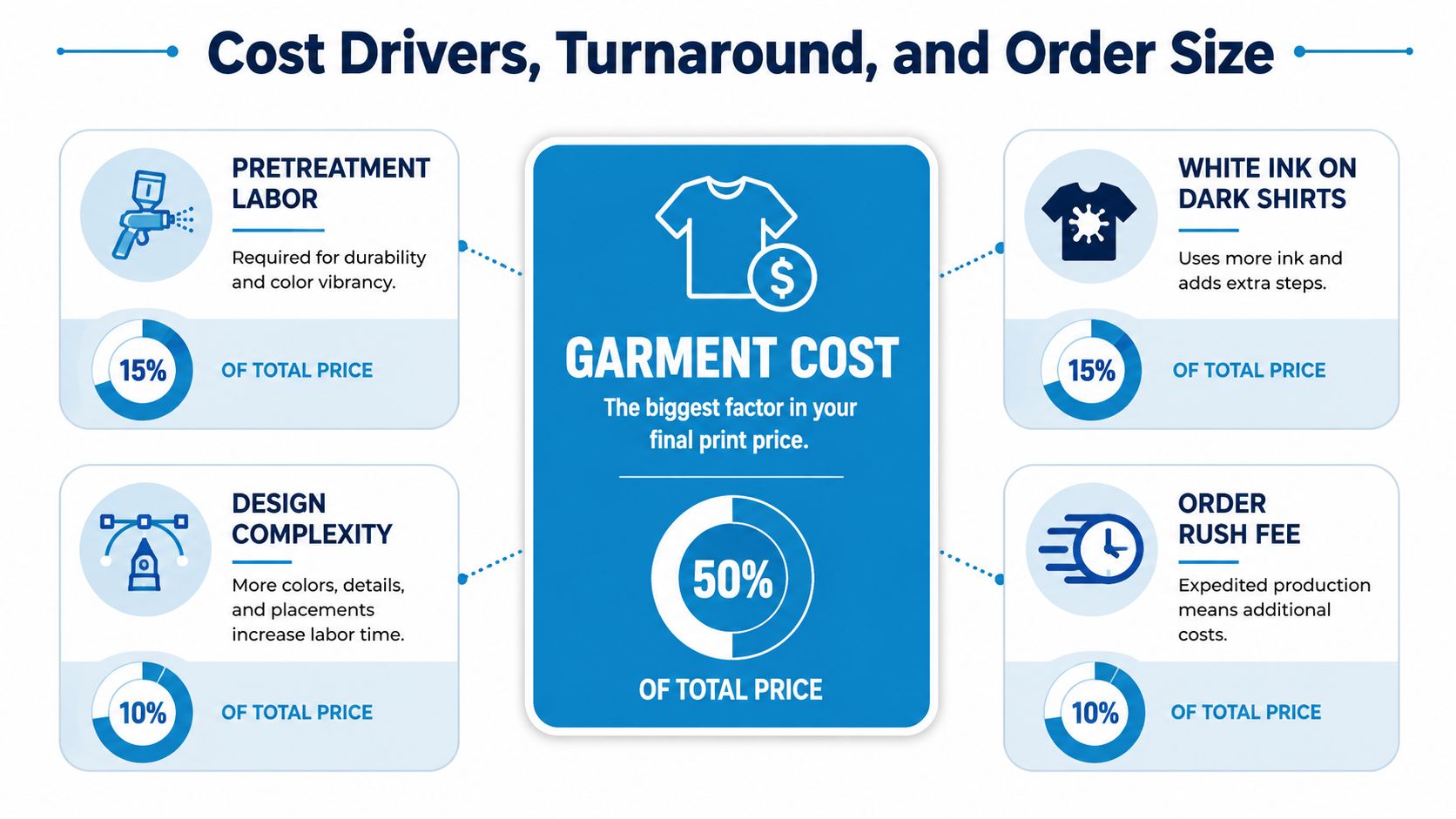
A first-time buyer usually has three decisions: how many garments to order, which blank to use, and when the finished pieces are needed. Those choices shape the quote more than printer speed alone. The shop must source the blank, prepare the fabric, print, cure, inspect, and meet the requested delivery schedule.
What changes the quote
- Garment cost: A premium blank costs more than a basic one. Fabric quality also affects how consistently the shirt accepts ink.
- Pretreatment labor: The operator prepares the garment before printing. Dark garments require more process attention because of the white ink layer.
- White ink on dark shirts: A white underbase uses additional ink and production time.
- Print areas: A front design costs differently from a combination of front, back, sleeve, and neck-label placements.
- Design coverage: Large, dense artwork consumes more ink than a small, lightly covered mark.
- Rush timing: A compressed deadline can require schedule changes and extra handling.
Order size changes the practical value of DTG. A shop can produce a small run without preparing screens, while a larger order may make other processes worth comparing. Ask whether the quote includes pretreatment, curing, inspection, packaging, and delivery, rather than comparing only the printed-shirt line item.
Industrial DTG systems can print a white shirt in roughly 10 seconds and a dark shirt in about 30 seconds, according to published DTG production guidance. These figures cover the printing pass, not the complete order. Pretreatment, curing, setup, and handling can determine the actual turnaround.
The DTG market has grown beyond niche equipment. Grand View Research's market analysis presents estimates that follow different forecast paths, including figures for the market's recent size and projected growth. That variation is a useful reminder to compare written quotes, production capacity, garment availability, and deadline commitments instead of relying on a market headline.
Care and Washing Instructions for DTG Prints
Correct curing gives the print a sound starting point, but the owner's washing habits still affect how the garment looks over time. Treat the printed shirt as a decorated textile, not as a disposable promotional item.
A practical wash routine
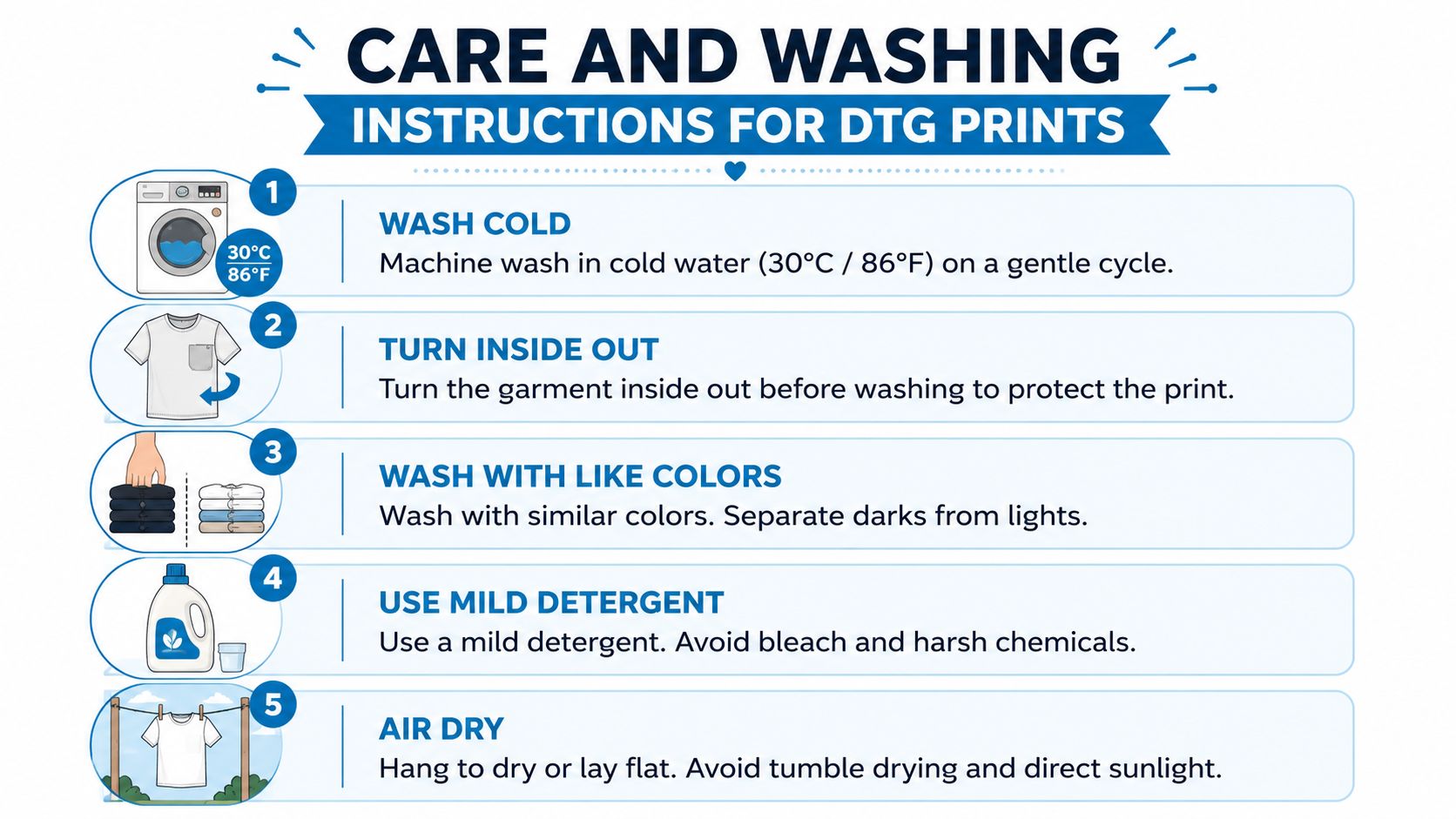
- Wash cold. Use cold water, around 30°C or 86°F or below, to reduce unnecessary heat exposure.
- Turn the garment inside out. This limits direct friction against the printed surface.
- Choose a mild detergent. Avoid bleach and harsh cleaning products that can affect the garment and print.
- Skip fabric softener. It can interfere with the surface and change the way the finished print feels.
- Air dry when possible. High-heat tumble drying adds stress. If you use a dryer, choose a lower-heat setting.
- Iron from the reverse side. Use low heat and never place the iron directly on the printed image.
Handle stains promptly with a gentle treatment rather than aggressive scrubbing over the artwork. Store shirts clean and dry, folded with the print protected from rough surfaces.
Care rule: Turn the shirt inside out, wash it cold, and keep direct heat away from the printed area.
Under proper care, a correctly pretreated and cured DTG print on 100% cotton can retain its color and detail through 50 or more wash cycles, as documented in the DTG care and durability guidance. That benchmark depends on production quality and laundering conditions, so it shouldn't be treated as a guarantee for every fabric or decorator.
When to Choose DTG for Your Apparel Project
DTG makes the most sense when your order needs flexibility more than maximum bulk speed. You can request a single custom shirt, test a design before committing to inventory, or produce a short run where every piece carries the same detailed artwork. The method is particularly useful for small-business launches, event merchandise, employee uniforms in modest quantities, personalized gifts, and rapid design prototyping.
Questions to ask before approving production
Is there a minimum order? DTG supports true one-off production because the design arrives digitally rather than through a screen setup. Confirm the decorator's own order policy, but the process itself can accommodate a single garment.
Can it scale? DTG can handle growing demand, but its per-unit throughput is generally slower than screen printing for very large runs. For a high-volume single-color order, request both methods on the same specification and compare total cost, schedule, and finish.
Will it last? Durability depends on fabric selection, pretreatment, ink coverage, and curing. A properly processed cotton garment followed by sensible washing should perform far better than one that was poorly pretreated or undercured.
Match the method to the job
Choose DTG when you have:
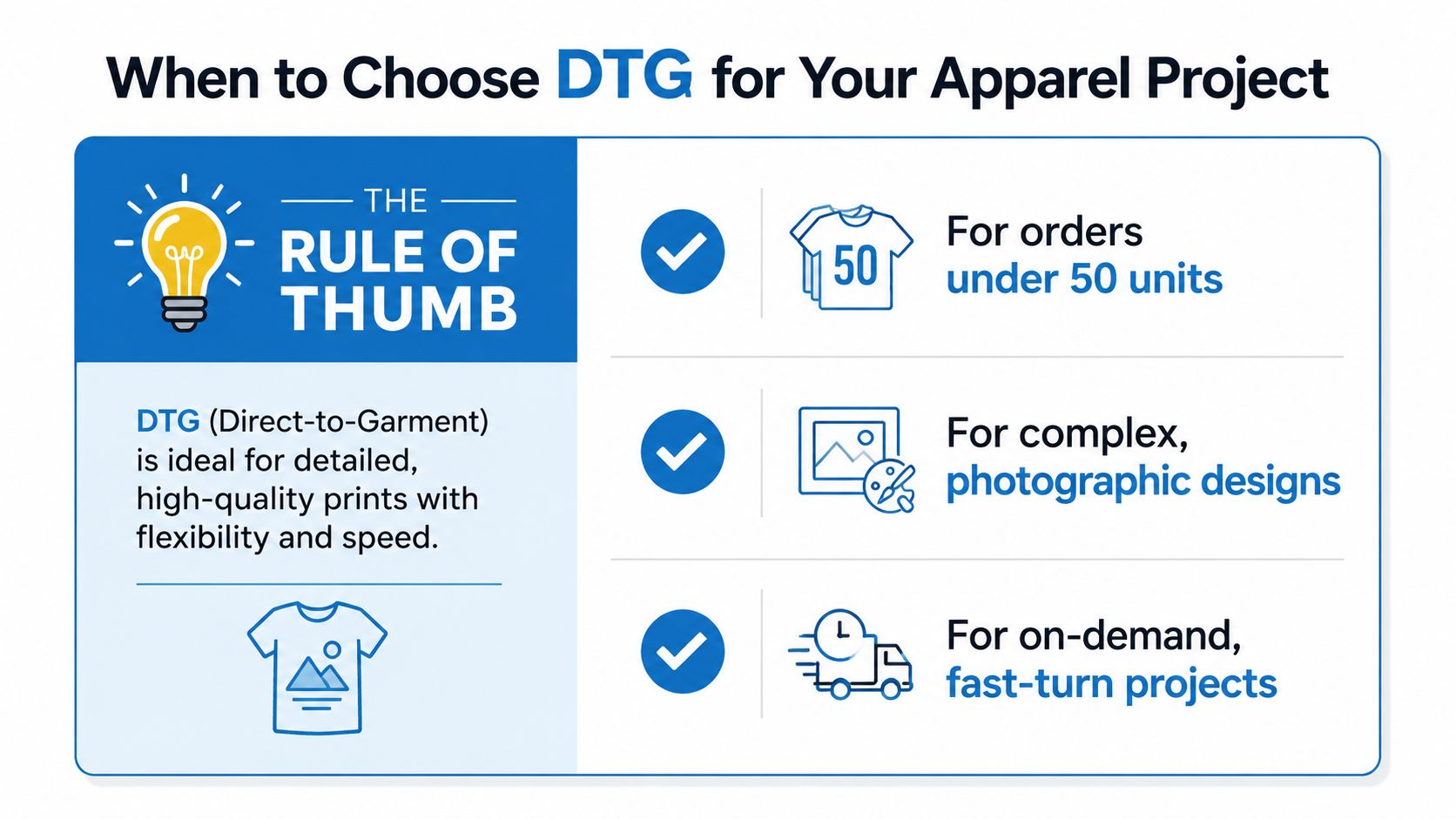
- A short run: You need a small quantity without committing to a large inventory.
- Complex artwork: Your design includes photographs, gradients, fine detail, or many colors.
- Cotton garments: The blank is natural-fiber apparel selected for ink absorption.
- A variable catalog: You sell different designs on demand and don't want to preprint every style.
- A deadline that favors digital setup: You need to move from an approved file to production without screen preparation.
Choose another method when the job centers on polyester athletic wear, a difficult synthetic surface, or a large wholesale order with a simple single-color logo. DTF may provide better flexibility for some blends and placements, while sublimation belongs on suitable polyester or coated products. Screen printing remains a strong comparison for large, consistent runs.
If your apparel supports a social commerce launch, the Shopify TikTok ad creatives guide can help you think through how product visuals and promotional concepts should work alongside an on-demand fulfillment model. The creative plan and the decoration method should agree. A detailed cotton shirt design needs a different production and marketing approach from a simple uniform mark.
Rule of thumb: Choose DTG for full-color designs on cotton, short runs, tight deadlines, or true on-demand fulfillment where setup cost matters more than maximum per-unit speed.
Dirt Cheap Product, Inc. provides custom apparel decoration, including DTG-adjacent options such as DTF, screen printing, sublimation, embroidery, and custom patches across shirts, hoodies, hats, bags, and more. Upload your artwork and visit Dirt Cheap Product, Inc. to compare garment options, request support with placement and file preparation, and get a proof for your next branded apparel order.