You're probably here because the tote bag looked like the easy part of the project. The campaign is approved, the event date is close, and someone needs a branded item people will genuinely keep. Then key questions show up. Which bag works best, what file format is acceptable, why does one printer ask about seams and strap clearance, and why can two totes with the same logo produce very different results?
That's where most bulk orders either get smooth or get expensive. Tote bag screen printing is straightforward when the bag, artwork, ink, and production method all match. It gets messy when one of those choices is made in a vacuum. A good print run starts before the first screen is exposed.
Table of Contents
- Why Screen Printing Is Perfect for Your Totes
- Choosing Your Totes and Preparing Artwork
- The Printer's Toolkit Inks Screens and Curing
- From Screen to Bag The Printing Process
- Ensuring Excellence Quality Control and Troubleshooting
- The Final Details Pricing Packaging and Turnaround
- Your Next Steps and Long-Term Care
Why Screen Printing Is Perfect for Your Totes
A tote bag earns its place because people use it. It travels to stores, offices, trade shows, schools, and weekend events. That gives your logo a lot more staying power than a throwaway handout.
Screen printing is usually the right decoration method when you're ordering totes in volume and want a bold, durable imprint. It lays down strong color, holds up well on common bag materials, and becomes more economical as quantity rises. That's why it remains the default choice for promotional totes, event bags, retail merch, and nonprofit campaigns.
The scale of the method tells you a lot about why it persists. The global screen printing market generated USD 20,743.3 million in 2024 and is projected to reach USD 37,359.1 million by 2030, growing at a CAGR of 10.3%. That growth reflects how well screen printing fits high-volume branded products like tote bags.
Why it beats other methods for bulk tote orders
Three things usually matter most to a buyer:
- Visibility: Screen printing produces bold color that reads from a distance.
- Durability: A properly printed tote handles repeated use better than decoration methods that sit too lightly on the surface.
- Cost control: Once setup is done, larger runs tend to make more financial sense than one-off digital approaches.
Practical rule: If your design is a clean logo, a simple message, or a few spot colors on a sizable order, screen printing is usually the professional answer.
That doesn't mean it's perfect for every job. If you need a tiny run, full-color photographic artwork, or highly detailed tonal transitions, another method may fit better. But for the kind of order most marketing managers place, repeatable branding on a usable product, tote bag screen printing is hard to beat.
Choosing Your Totes and Preparing Artwork
The two decisions that shape the whole project are the bag itself and the file you send. Most problems in production start with one of those.
Pick the bag for the job, not just the price
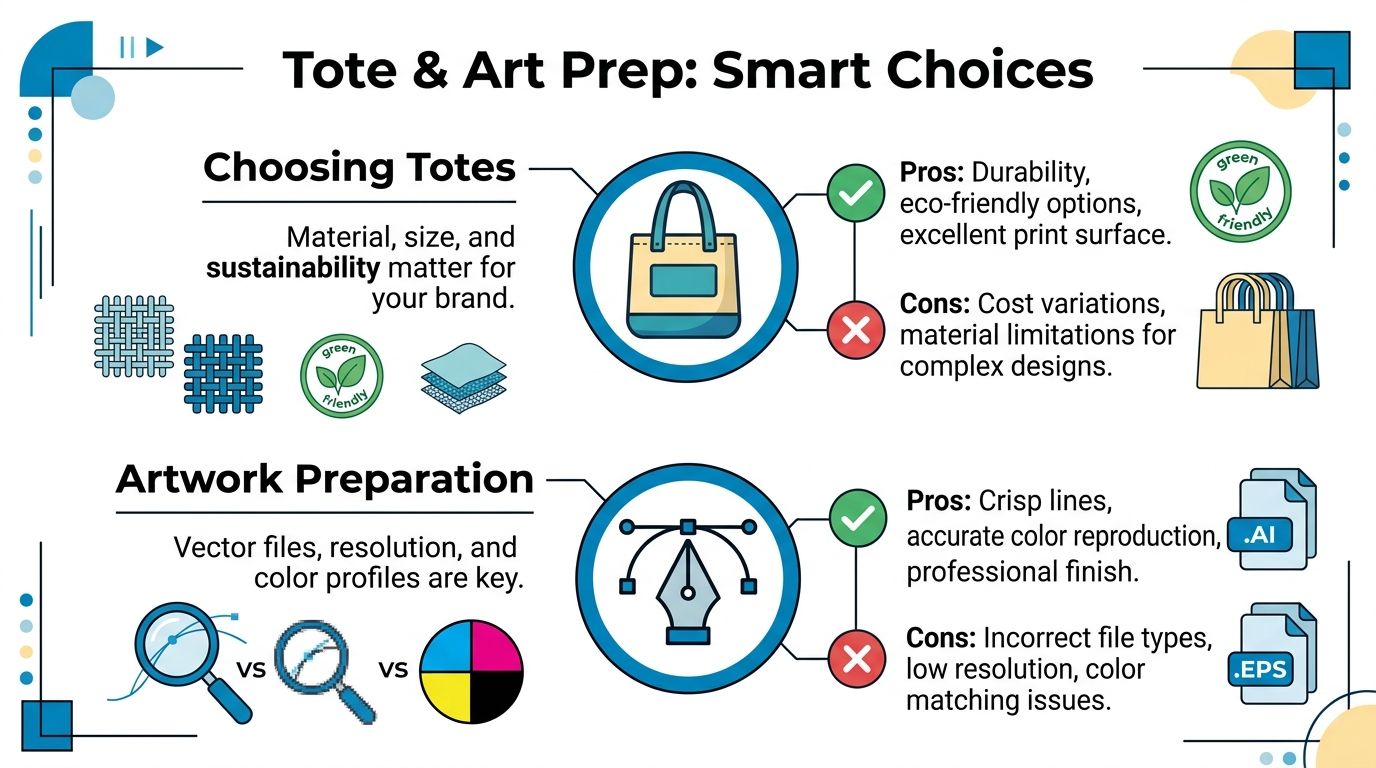
Standard cotton totes are often the easiest place to start. They're familiar, broadly useful, and generally take simple spot-color art well. Heavy canvas feels more substantial and can look better for premium promotions or retail-style merch, but it also demands more from the printer because the texture is rougher and the fabric is thicker.
Recycled and certified organic options deserve attention too. They can align better with sustainability goals, and buyers increasingly ask for them. The catch is that sustainable substrates don't always behave exactly like standard cotton. Ink absorption, surface feel, and finishing can vary, so it helps to confirm the material early instead of treating all totes like interchangeable blanks.
A quick way to think about tote selection:
| Bag type | Best use | Main trade-off |
|---|---|---|
| Standard cotton | Events, giveaways, broad campaigns | Less premium feel than heavier canvas |
| Heavy canvas | Retail merch, upscale promos, durable everyday use | Tougher surface to print cleanly |
| Recycled or organic cotton | Eco-conscious branding programs | Material behavior can vary more from run to run |
If you're still comparing options, browsing bulk custom tote bag choices can help you align material and intended use before art is finalized.
Build artwork that prints cleanly
Printers can fix a lot. A low-quality file usually isn't one of those things.
For the cleanest result, artwork should be vector in .ai, .eps, or .svg format at ≥300 ppi resolution. Vector art matters because it keeps edges sharp, allows proper color separation, and avoids the fuzzy look that shows up when someone sends a flattened web graphic.
The other mistake that causes trouble is placement. The same source notes that placing ink within 1 inch of seams or straps can cause a 25 to 30% defect rate in non-compliant orders because the print area becomes uneven and registration suffers. On bags, that clearance isn't a suggestion. It's part of getting a stable print.
Keep logos away from straps, seams, and thick stitched areas. The design might look centered on a mockup and still be a bad production choice on the actual bag.
A good art handoff includes:
- Vector files: .ai, .eps, or .svg are preferred.
- Color direction: Pantone Solid Coated references are best when brand color matters.
- Placement intent: Front only, both sides, or a clear note on panel location.
- Size awareness: Large enough to read, but not pushed into problem areas.
What works best in real orders
Bold logos and clean type usually print best on totes. Large solid shapes tend to hold up better than tiny reverses, thin outlines, or layered complexity on textured fabric. If your design depends on subtle gradients or intricate multicolor detail, ask that question before the quote becomes an approval.
Marketing teams usually get the best results when they finalize these choices up front:
- Choose the bag first
- Match the art style to the fabric
- Confirm colors and placement before proof approval
That sequence prevents the classic last-minute scramble where the art was built for a smooth garment but the order ends up on a textured tote.
The Printer's Toolkit Inks Screens and Curing
A client doesn't need to run the press, but understanding a few shop-side basics makes it easier to judge proofs, ask better questions, and avoid preventable disappointments.
What clients should know about screens
Every screen print starts with a stencil on mesh. That screen controls where ink passes and where it doesn't. Fine detail, bold fills, and fabric texture all influence how the printer builds that setup.
On tote bags, the challenge isn't just the art. It's the surface. Bags can have weave texture, seams, slight panel movement, and varying absorbency. A design that looks easy on paper may require very deliberate setup choices once it hits canvas.
That's why simple art often outperforms complicated art on bags. The printer has more room to keep edges crisp, registration tighter, and coverage more consistent.
Why ink choice changes the result
For tote bag screen printing, plastisol is often the practical default. Industry guidance notes that plastisol inks are favored for durable tote bag printing because of their high opacity, and they require mandatory heat-curing between ink layers so the design bonds correctly with the fabric.
That matters for a buyer because opacity affects how strong the color looks, especially on textured or darker materials. Bonding affects whether the print feels stable and lasting instead of fragile.
Water-based ink can be a strong choice too, especially when a softer hand feel is the priority. It often gives a more absorbed, less raised look on suitable fabrics. If you want to understand that option better, this overview of water-based ink printing gives useful context on how it differs from plastisol in look and feel.
A tote print isn't just color on fabric. It's the combination of ink chemistry, mesh setup, pressure, and curing.
Curing is where durability is won or lost
Clients often focus on the print stroke because that's the visible part. The curing stage is just as important. Ink that looks fine when it comes off press can still fail later if it wasn't properly cured.
In practical terms, curing is what turns a fresh print into a usable product. Without it, the ink may smear, crack, or lose integrity in use. With multilayer printing, each layer has to be managed carefully so colors build correctly without destabilizing the previous pass.
A strong shop pays attention to:
- Ink compatibility: The ink has to suit the bag material and artwork style.
- Layer control: Multi-color jobs need disciplined buildup between colors.
- Consistent curing: Every bag in the run has to reach the right finish, not just the first few.
Clients don't need every technical setting. They do need to know that a reliable tote print comes from a controlled process, not just a nice mockup.
From Screen to Bag The Printing Process
The actual printing run is where your approved proof becomes a stack of physical bags. This is also where good planning pays off. Clean art, realistic placement, and the right tote blank make the pressroom part much smoother.
A helpful visual makes the sequence easier to picture.
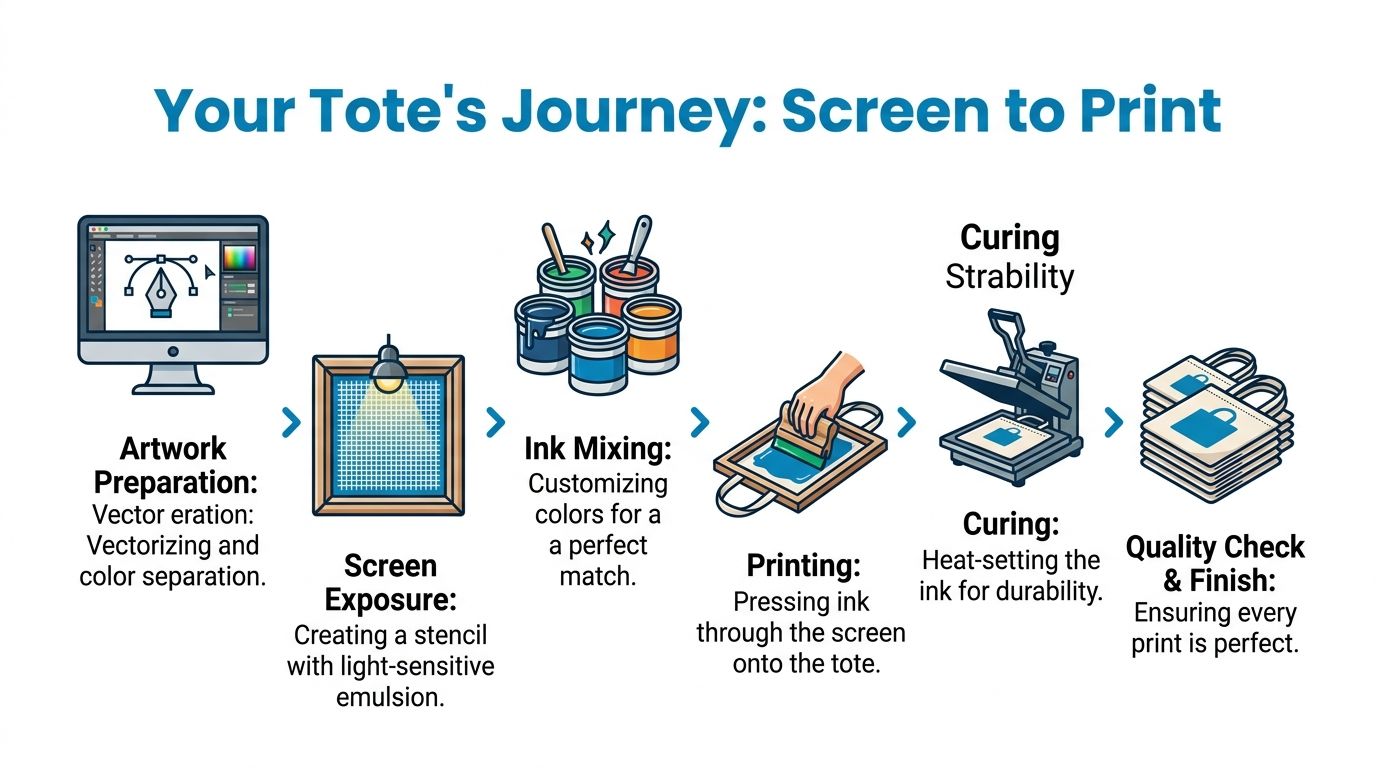
Registration pressure and off-contact
The press is set for the bag size and print location. Screens are aligned so the image lands where it should, especially on multi-color designs where one color drifting even slightly will make the whole print look off.
Then comes pressure and off-contact. Off-contact is the small gap between the screen and the tote during the print stroke. On textured bags, that small space matters. Too little control and the print can get mushy. Too much or too aggressive a setup and the ink can behave badly on the fabric.
A real practitioner complaint on Reddit described canvas prints coming out “too inky,” with community advice pointing to support inside the tote and a thin slice of space for better off-contact control, as discussed in this screen printing tote troubleshooting thread. That's a useful reminder that tote printing isn't just scaled-down shirt printing.
Later in the run, many teams want to see the process in motion. This video gives a clear look at how professional screen printing moves from setup to finished bag.
Heavy canvas needs a different touch
Heavy canvas asks for more than a light surface pass. According to this guide to printing on canvas bags, expert printers use a double pass squeegee technique with heavy pressure on heavy canvas so the ink penetrates the textured fabric instead of sitting on top. That improves durability and helps prevent the cracking that shows up in weak prints.
Here's the practical difference between a good heavy-canvas run and a mediocre one:
- A shallow print stroke leaves ink riding on the top texture.
- A controlled double pass drives ink into the fabric more effectively.
- A rushed setup raises the chance of smearing, uneven coverage, or soft detail.
On thick canvas, the goal isn't just to make the art visible. The goal is to get the ink into the fabric enough that the print behaves like part of the bag.
Multi-color designs may also need flash curing between layers so each color can be built cleanly. That's one reason tote orders with more complex art require more patience on press than a simple one-color logo.
Ensuring Excellence Quality Control and Troubleshooting
A professional tote order isn't judged by the best print in the box. It's judged by the consistency across the run. Quality control is what separates a reliable production process from a lucky one.
What gets checked before an order ships
Good QC starts with obvious things and then moves into the details. Is the print in the right place? Are the colors consistent against the approved proof? Are edges clean, registration stable, and the surface free from smudging or preventable blemishes?
On bags, teams also watch for issues unique to the item itself. Seams can interfere with print placement. Fabric texture can create uneven deposit. Handles and stitching can affect how flat the panel sits during production.
A useful QC checklist often includes:
- Placement check: The logo sits where the approval indicated.
- Print consistency: Coverage and color look uniform across the run.
- Surface review: No obvious smears, ghosting, or accidental marks.
- Bag condition: The tote itself is clean and presentable before packing.
For operations teams building repeatable workflows, resources that streamline your quality control process can be useful because they reinforce documentation habits and inspection discipline.
How professionals handle production reality
Screen printing is precise, but it's still a physical process on fabric goods. That means industry standards matter. One of the clearest is the accepted misprint allowance.
The industry-standard misprint allowance for screen printing orders on bags is 3%. In plain language, a small fraction of a run may contain minor defects that fall within accepted production norms.
That number shouldn't scare a buyer. It should set a realistic expectation. Anyone ordering bags in quantity should know that a print shop can control process well without claiming perfect mechanical sameness on every single piece.
Some production variation is normal. The real measure of a shop is how well it prevents recurring issues, catches defects before shipping, and communicates clearly about acceptable standards.
When problems do appear, experienced teams troubleshoot by tracing the issue to the likely source. If registration shifts, they inspect setup stability. If ink looks too heavy, they examine pressure, off-contact, and garment support. If the surface looks rough, they review whether the bag material and art style were a poor match from the start.
That's the value of strong pre-production combined with disciplined QC. Fewer surprises leave the shop, and the client gets an order they can hand out with confidence.
The Final Details Pricing Packaging and Turnaround
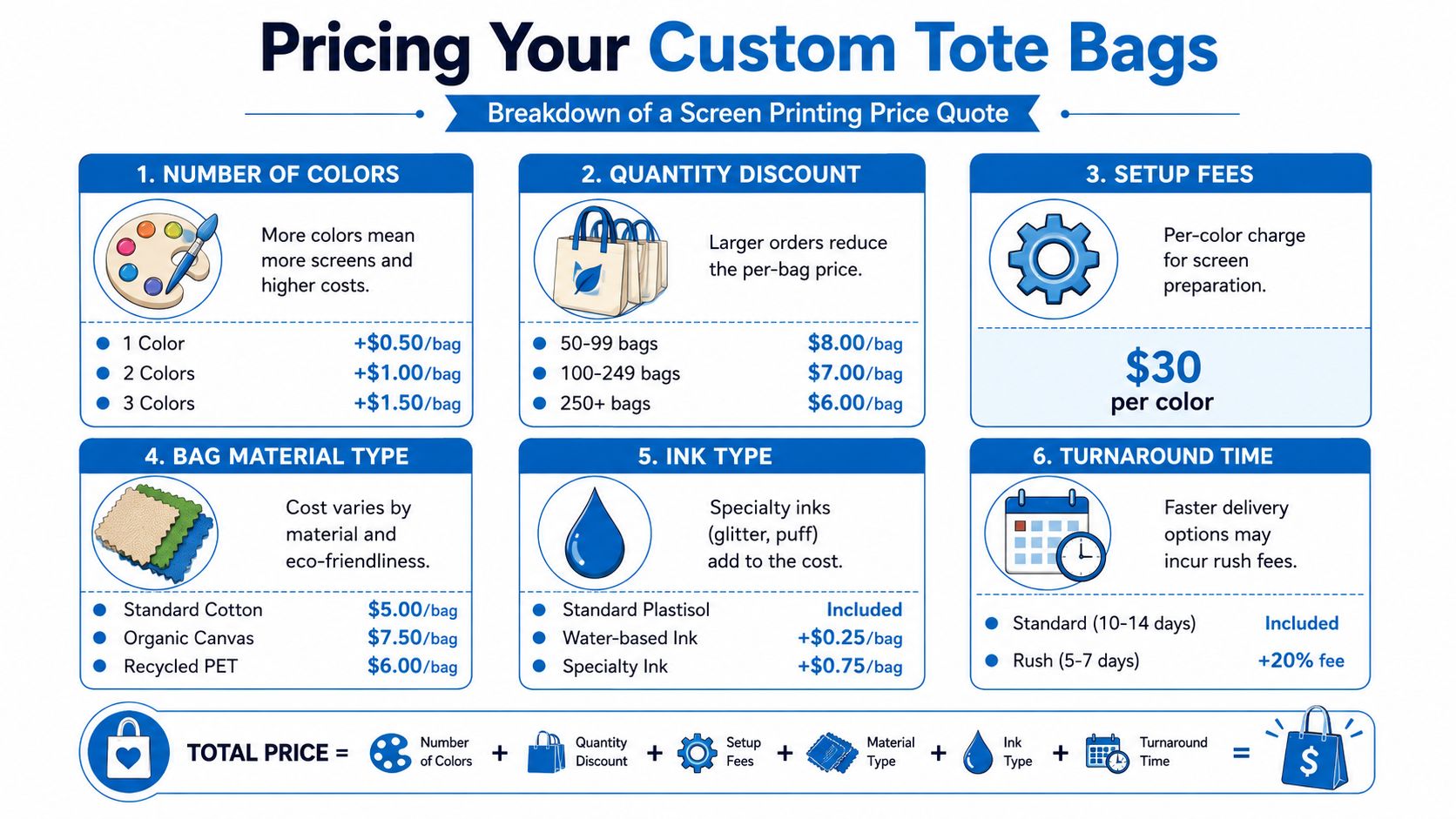
Pricing questions usually sound simple. Why does this tote cost what it costs? The answer is that the quote reflects several production choices, not just the blank bag.
What actually changes the quote
The biggest cost drivers are quantity, artwork complexity, and the tote itself. A basic one-color design on a straightforward cotton tote is one kind of job. A multi-color print on heavier canvas is another.
One verified benchmark helps frame the decision. Screen printing on tote bags is the standard for bulk orders and typically requires a minimum quantity of 15 pieces to be cost-effective for production setup. For orders below that threshold, digital methods are often recommended.
That's because screen printing has setup work built into it. Screens have to be prepared, alignment has to be dialed in, and the press has to be made ready for the run. Once that setup is spread across more units, the economics make more sense.
The quote usually moves based on:
- Number of print colors: More colors usually mean more setup and more press time.
- Bag material: Standard cotton, heavy canvas, and specialty eco materials don't behave or cost the same.
- Print location: One side is simpler than multiple print areas.
- Order size: Larger runs generally improve per-piece efficiency.
If you're comparing decoration options and timelines, reviewing an online screen printing workflow can help frame what information a printer needs before pricing becomes firm.
Packaging and timeline planning
Packaging matters more than clients expect. Tote bags need to be counted accurately, folded consistently, and boxed in a way that protects the print in transit. A bag that leaves the press looking great can arrive looking sloppy if it's packed carelessly.
Turnaround depends on art readiness, bag availability, production load, and job complexity. A client can speed up a project by doing the early decisions well. Final quantity, final art, and final color direction are what keep a job from stalling.
A practical planning list looks like this:
- Lock quantity early: Changing quantities late can affect bag sourcing and scheduling.
- Approve art carefully: A rushed proof approval often causes the delay you were trying to avoid.
- Allow time for production reality: Complex jobs, specialty bags, and tight event dates need more margin.
- Ask about packing needs: Some orders need sorted counts by location, team, or event use.
If you're ordering for a launch, conference, or retail date, backward planning is the safest approach. Work from the in-hands date, not the date you want to place the order.
Your Next Steps and Long-Term Care
The cleanest tote orders usually come from clients who lock the basics before production starts. Decide the bag style, confirm the quantity, send vector artwork, specify your brand colors clearly, and give the printer enough time to do the job right.
A simple order checklist
Before approving the job, make sure you can answer these clearly:
- Which tote are you printing on
- What file format are you sending
- Which colors need to match closely
- Where should the art sit on the bag
- When do you need the order in hand
If you sell printed bags as merch, gift them to creators, or work with artist-led brands, this helpful guide for UK artists is worth a look because it ties product presentation to real selling context.
Care instructions worth passing along
Once the bags are printed, care still matters. Most clients never think about this part, but it helps preserve the look of the print over time.
Pass along simple instructions:
- Wash gently: Cold water is the safe default.
- Turn the bag inside out when possible: That reduces abrasion on the print face.
- Skip harsh drying: Air drying is the better option when you want the decoration to last.
- Avoid aggressive heat on the print area: Excess heat can shorten the life of decorated fabric.
Good tote bag screen printing starts with smart buying decisions and ends with realistic handling after delivery. If both parts are done well, the bag keeps working long after the event is over.
If you're ready to price out a bulk tote project, get artwork reviewed, or talk through the right bag and print method, Dirt Cheap Product, Inc. can help you move from idea to finished order with responsive support and fast-turnaround production.